

RGPD & Data Retention
You run a SovEcom store in the EU, so you are the data controller for every customer record it holds. This guide covers the four things you act on: cookie consent on the storefront, the data-export and erasure paths your customers and your staff use, the retention windows SovEcom enforces, and the records you keep on paper to satisfy an audit. Every behavior below comes from the code as it ships.
Read the scope rule first. Self-hosting makes you the controller in GDPR terms. SovEcom the project ships software, runs none of your data, and acts as a processor only on the managed Cloud (covered at the end). The controller-versus-processor split decides who answers a regulator, so read Controller vs processor before you publish a privacy notice.
Cookie consent
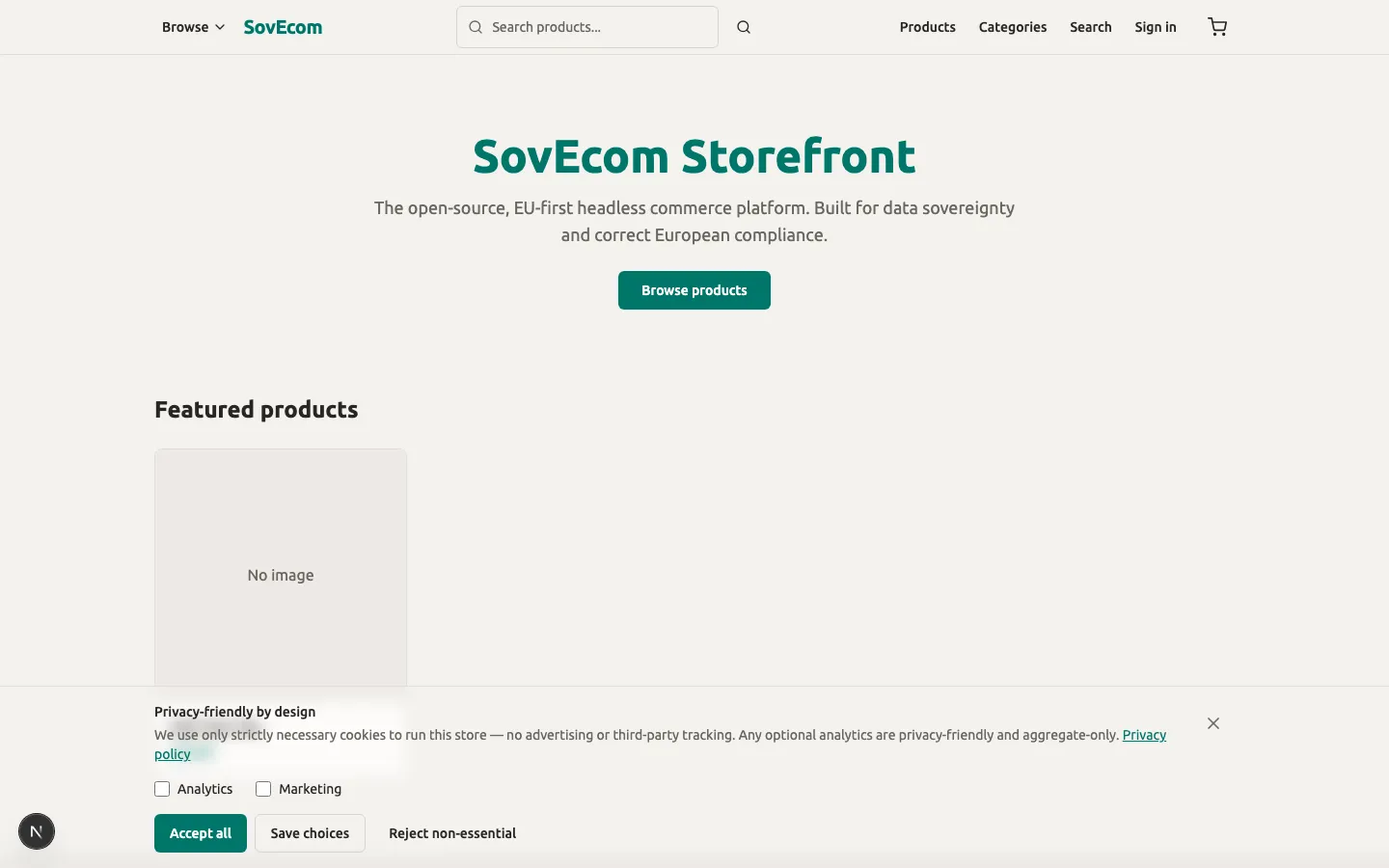
Section titled “Cookie consent”The storefront ships a consent gate that blocks trackers until the visitor opts in. Three tiers decide what loads:
| Category | Example | Consent needed | Behavior |
|---|---|---|---|
| Strictly necessary | session, cart, CSRF, the consent cookie itself | None | Always loads |
| Analytics | Google Analytics 4 | Opt-in (analytics) | Loads only after the visitor ticks it |
| Marketing | Meta Pixel | Opt-in (marketing) | Loads only after the visitor ticks it |
Plausible sits outside this table. It is cookieless, so it loads whenever you set a Plausible domain and ignores the consent state. GA4 and Meta Pixel check that state on every render.
Both analytics categories default to off. The banner shows only while the visitor has made no decision, and it renders after hydration so a returning visitor never sees a flash. Clicking “Reject” or the close (X) button records both categories off, “Accept all” records both on, and “Save” records what the visitor ticked.
The visitor’s choice lives in a first-party cookie named cookie_consent, with a one-year max-age, SameSite=Lax, and Secure on HTTPS. The value is compact: a1m0 means analytics on, marketing off. No third party reads this cookie.
Withdrawal has a sharp edge
Section titled “Withdrawal has a sharp edge”A returning visitor re-opens the banner through a “Manage cookies” control to change a recorded decision. Granting a new category takes effect in place, with no reload. Revoking a category that already loaded works differently. next/script cannot unload a running GA4 or Meta SDK, so the banner forces a full page reload to clear it. No in-session withdrawal stops an already-running tracker without that reload. Document this in your privacy notice if you list a “withdraw consent” mechanism.
Turning analytics on
Section titled “Turning analytics on”You configure Plausible, GA4, and Meta Pixel in your active theme’s analytics settings, not in storefront environment variables. The storefront reads the analytics block from GET /store/v1/theme and passes the Plausible domain, GA4 id, and Meta Pixel id to the consent-aware loader. Leave a field blank and that tracker never loads, whatever the consent state.
Data export (Art. 15 / 20)
Section titled “Data export (Art. 15 / 20)”A signed-in customer exports their own data from Account → Privacy on the storefront. The export is a JSON document the customer downloads. It carries the disclosure a subject-access request demands under Article 15, in the portable JSON form Article 20 asks for.
The export discloses every category of personal data the store holds about that customer. Allowlist serializers build it, so no other customer’s data and no internal columns leak:
| Section | Fields disclosed |
|---|---|
profile | id, email, name, phone, B2B flag, VAT number, VAT-validated flag, marketing flag, created-at |
addresses | every saved address |
orders | order number, status, currency, order email, money totals (integer minor units), the shipping and billing address snapshots, line items |
invoices | type, series, invoice number, currency, total, tax, reverse-charge flag, issued-at |
emailLogs | recipient, type, subject, status, sent-at, created-at (metadata only, never the message body) |
The 2026-06-18 fix added the orders, invoice-metadata, and email-metadata sections so the export discloses everything the erase path scrubs. Money stays in integer minor units plus a three-letter currency code, never a float.
Step-up password check
Section titled “Step-up password check”The export endpoint is POST /store/v1/customers/me/rgpd/export. It uses POST so it can carry the customer’s current password in the body (ruling A). The server verifies that password with argon2id before it discloses anything. A wrong password returns 401 and exports nothing. The path allows 5 attempts per minute per IP and customer, and it fails closed, so it never becomes a password oracle.
Every successful export writes a customer.data_exported audit row, with the customer as actor. The audit log lets you prove you honored a request.
Data erasure / pseudonymization (Art. 17)
Section titled “Data erasure / pseudonymization (Art. 17)”SovEcom does not hard-delete a customer. It pseudonymizes. The row stays, scrubbed of every identifier, so the order and invoice history a tax authority can demand survives while the person becomes unidentifiable. This is the Article 17(3)(b) carve-out, where erasure does not override a legal retention obligation.
Two paths trigger it, both irreversible:
- Customer self-service —
POST /store/v1/customers/me/rgpd/erasefrom Account → Privacy, gated by the same step-up password check and rate limit as export. - Admin —
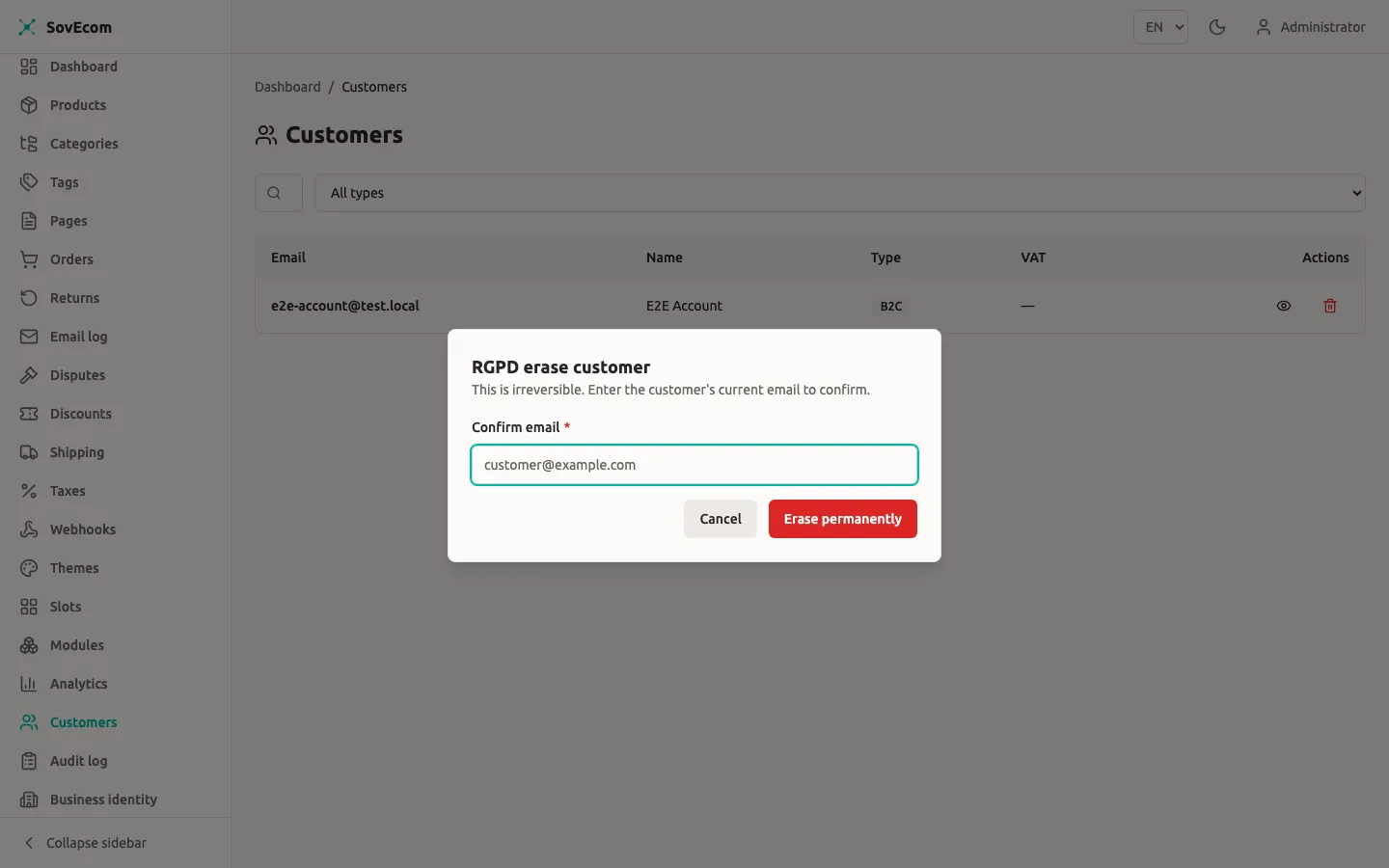
DELETE /admin/v1/customers/:id, behind the admin JWT guard and the customer-delete permission. The admin must echo the target’s current email exactly inconfirmEmail; a mismatch or a missing value returns 400 and erases nothing.
After either path, the customer can no longer log in.
What one erase transaction does
Section titled “What one erase transaction does”The erase runs as a single database transaction. If any step fails, the whole thing rolls back, and an irreversible erase never commits unaudited:
- Set
anonymized_atanddeleted_atto now, setemailtoanonymized-{uuid}@deleted.local, and null outname,phone,password_hash, andtotp_secret. This shape satisfies thecustomers_anonymized_chkconstraint. - Scrub the VAT number, VAT-validated flags, and the
vatmetadata key from the stub. - Delete every saved address row.
- On the customer’s orders, replace the email with the anonymized address and collapse each shipping and billing address snapshot to its country only, with an
erasedflag. The order row survives as a commercial record. - Scrub the recipient on every transactional email logged to that address, matched case-insensitively.
- Revoke every active session so a pre-erase token stops working.
- Hard-delete the customer’s email-change tokens, each carrying a third party’s email, and the password-reset tokens.
- Write a
customer.erasedaudit row in the same transaction, recording whether it ran viaselforadmin.
Retention schedule
Section titled “Retention schedule”SovEcom enforces several windows automatically. Two of them, orders and invoices, it does not auto-purge, because they sit under a fiscal obligation you must honor for the full period.
| Data | Window | Mechanism |
|---|---|---|
| Invoices | Fiscal retention (e.g. 10 years in FR/DE) | Immutable; DB blocks DELETE and UPDATE. No auto-purge. You hold them for the legal period. |
| Orders | Same fiscal period as invoices | Retained as commercial records; PII scrubbed on erase. No auto-purge. |
| Audit log | ≥ 2 years (NFR-SEC-003) | tenant_id is RESTRICT, so a tenant with audit rows cannot be hard-deleted. No auto-purge. |
| Carts (guest) | 7 days | Each cart carries an expires_at set at creation (7 days for a guest). The daily cleanup cron deletes Postgres carts past expires_at. Redis TTL is 8 days (7-day expiry + 1-day buffer). |
| Carts (registered) | 30 days | Same expires_at mechanism, set to 30 days for a logged-in customer, purged by the same daily cron. |
| Credential tokens | 7-day grace past expiry | TokenRetentionSweeperService, daily at midnight, hard-deletes dead email-change and password-reset token rows. |
| Stale unpaid orders | 60 min (default) | StaleOrderSweeperService, every 10 minutes, cancels pending_payment orders and releases their stock. |
Tuning the windows you can tune
Section titled “Tuning the windows you can tune”The token-retention grace reads TOKEN_RETENTION_DAYS, default 7, clamped to 1–90:
# apps/api environmentTOKEN_RETENTION_DAYS=7The stale-order window reads UNPAID_ORDER_TTL_MINUTES, default 60, clamped to a maximum of 23 hours:
# apps/api environmentUNPAID_ORDER_TTL_MINUTES=60The cart expiry windows (7 days guest, 30 days registered) and the cart Redis TTL are constants in the cart code, not environment variables. Treat every auto-purge job as steady-state hygiene, never as your GDPR erasure mechanism. Erasure is the pseudonymization transaction above.
Article 30 processing record
Section titled “Article 30 processing record”As controller you keep a record of processing activities. SovEcom does not generate it. The template below seeds it with what a default SovEcom store does. Fill in your legal entity, adjust the trackers you enabled, and review it whenever you add a module that processes personal data.
| Activity | Purpose | Legal basis | Categories | Recipients | Retention |
|---|---|---|---|---|---|
| Account management | Operate customer accounts | Contract | Identity, contact, credentials | None | Until erasure |
| Order & invoice processing | Fulfil and bill orders | Contract; legal obligation (invoices) | Identity, contact, address, order, fiscal | Payment processor, carrier | Fiscal period for invoices/orders |
| Transactional email | Order and account notifications | Contract | Email, message metadata | Email provider | Per email-log retention |
| Login security | Lockout, audit, fraud prevention | Legitimate interest | IP, user agent, auth events | None | Audit ≥ 2 years |
| Plausible analytics | Aggregate, cookieless traffic stats | Legitimate interest | Truncated/aggregated only | Plausible (self-host to keep in-house) | Per Plausible config |
| GA4 (if enabled) | Web analytics | Consent | Device, behavior, identifiers | Google (third country) | Per GA config |
| Meta Pixel (if enabled) | Marketing measurement | Consent | Device, behavior, identifiers | Meta (third country) | Per Meta config |
Controller vs processor
Section titled “Controller vs processor”The split changes with how you run SovEcom.
Self-hosted (this guide). You install and operate the software on your own infrastructure. You decide why and how customer data is processed, so you are the controller. SovEcom the project supplies code under AGPL-3.0 and touches none of your data. Every sub-processor you wire in (payment processor, email provider, carrier, GA4, Meta) is your processor, and you need a data-processing agreement with each.
Managed Cloud. SovEcom operates the infrastructure and processes data on your instructions. There, SovEcom is the processor and you remain the controller. A DPA between you and SovEcom governs that relationship, lists sub-processors, and sets breach-notification timelines. A future multi-tenant cloud will use the tenant_id threaded through every query to isolate one processor across many controllers.
Either way you are the controller toward your customers. The processor designation describes who runs the metal.
Breach response
Section titled “Breach response”You have 72 hours from becoming aware of a personal-data breach to notify your supervisory authority (Article 33), and you tell affected individuals without undue delay when the risk to them is high (Article 34). Prepare before you need it:
- Detect and contain. Pull the audit log first. It records actor, IP, user agent, and timestamp for security-relevant actions and is retained at least two years, so it is your primary forensic source.
- Assess scope. Work out which tenants, which customers, and which categories are affected. Self-hosted means you own this assessment end to end.
- Notify the authority within 72 hours if the breach is likely to risk individuals’ rights. Record what you sent and when.
- Notify individuals when the risk is high. The audit log and the erasure records help you scope the affected set.
- Record the breach in your internal register whether or not you notified. The register is itself an accountability obligation.
On the managed Cloud, your DPA sets how fast SovEcom-the-processor must alert you so your own 72-hour clock can start. Self-hosted, no upstream processor alerts you; you are the first and last line.
Data-processing agreements
Section titled “Data-processing agreements”A DPA is the Article 28 contract every controller-processor relationship needs.
- Self-hosted: you sign a DPA with each of your own processors (payment, email, carrier, any analytics you enabled, your hosting provider). Keep them in one folder you can produce on request.
- Managed Cloud: you sign a DPA with SovEcom, who is then your processor. That agreement lists SovEcom’s sub-processors and the breach-notification timeline.
Related guides
Section titled “Related guides”- Customer Management — the account, VAT-validation, lockout, and RGPD endpoints in full.
- Orders — order lifecycle and the records erasure preserves.