

Payments
SovEcom collects money through one live gateway today: Stripe. The card number never touches your API. Stripe’s hosted Payment Element collects the PAN in the customer’s browser, so your store stays in PCI SAQ-A scope. Your server sees a payment-intent id, an amount in integer minor units, and a currency code.
This guide covers what ships in v1: the Stripe card flow, SEPA Direct Debit, Apple Pay and Google Pay (which ride the same Stripe Element), recording offline payments by hand, refunds with credit notes, and dispute handling. Where a feature is planned but not yet built, the page marks it.
What is implemented vs planned
Section titled “What is implemented vs planned”| Capability | State | Notes |
|---|---|---|
| Stripe card payments | Live | Hosted Payment Element, SAQ-A, webhook-confirmed |
| SEPA Direct Debit | Live | Async clearing; order goes paid only when funds settle |
| Apple Pay / Google Pay | Live | No extra code; surfaced by the same Stripe Element |
| Manual / offline payments | Live | Recorded by an admin via the orders API |
| Refunds + credit notes | Live | Full, line-item, or partial-amount; gapless credit-note numbering |
| Disputes / chargebacks | Live | Recorded from Stripe; fulfillment auto-frozen on open |
| Mollie | Planned | Provider stub only; every method throws today |
| Redirect gateways (PayU, PayFast, Mollie hosted) | Not yet available | A redirect gateway requires additional work beyond the current provider seam and is not yet implemented |
| Admin screens for payments / refunds / disputes | Planned | The behaviour exists as API endpoints; no dedicated admin UI ships yet |
Adding another gateway is a core integration, not a module
Section titled “Adding another gateway is a core integration, not a module”This is the most-asked question, so it gets answered up front. If a client needs a regional gateway (PayU, PayFast, Mollie, anything), you cannot add it as a sandboxed module. The module sandbox is never granted a payment capability, by design. Untrusted third-party code never sits on the money path, and that posture is permanent.
A new gateway is a trusted core integration. You implement the PaymentProvider interface, register it in the dependency-injection container, and add a webhook controller. For a Stripe-shaped gateway (one that returns a client secret for an in-page Element) that is roughly one to two days of work and touches no checkout logic. A redirect gateway (where the customer leaves your site to a hosted page) is larger: the current provider seam returns a clientSecret, but a redirect gateway needs a redirectUrl plus its own webhook signature scheme. That work is not yet implemented.
The storage already supports this. The payments table is provider-agnostic (provider, provider_payment_id, method, metadata), and webhook de-duplication keys on (provider, event_id). A second provider corners nothing in the database.
Configuring Stripe
Section titled “Configuring Stripe”You wire Stripe from environment variables. When STRIPE_SECRET_KEY is absent the app still boots (handy for local dev and tests), and every payment call returns 503 Service Unavailable instead of silently doing nothing. You will see this warning in the logs at startup:
Stripe disabled — no STRIPE_SECRET_KEY configured; payments will 503Set these on the API process:
# Server-side secret key (sk_live_… / sk_test_…). NEVER expose this to the browser.STRIPE_SECRET_KEY=sk_live_xxx
# Webhook signing secret (whsec_…). Without it, EVERY webhook is rejected (fail-closed).STRIPE_WEBHOOK_SECRET=whsec_xxx
# Optional: pin the Stripe API version. Defaults to the version the SDK is typed against.STRIPE_API_VERSION=2026-05-27.dahlia
The storefront needs the publishable key, and only that:
# Storefront (Next.js): publishable key only. Safe to ship to the browser.NEXT_PUBLIC_STRIPE_PUBLISHABLE_KEY=pk_live_xxxThe code pins the Stripe API version (2026-05-27.dahlia) so a server-side Stripe upgrade can’t change behaviour underneath you. Override it through STRIPE_API_VERSION only when you deliberately bump it, the same way you would any dependency. Stripe telemetry is off (the EU-privacy default).
Point Stripe at your webhook
Section titled “Point Stripe at your webhook”The webhook is the source of truth for “this order is paid”. Not the browser, not the success page. In your Stripe Dashboard, add an endpoint pointing at:
POST https://your-store.example.com/webhooks/stripeSubscribe it to at least these event types:
| Event | What SovEcom does |
|---|---|
payment_intent.succeeded | Marks the payment succeeded, drives the order to paid, issues the invoice |
payment_intent.processing | Records an async (SEPA) payment as processing; the order stays pending_payment |
payment_intent.payment_failed | Marks the payment failed; the order stays payable so the customer can retry |
charge.dispute.created / .updated / .closed | Records the dispute; freezes fulfillment on open |
refund.created / refund.updated | Reconciles a Stripe-dashboard or async refund |
charge.refunded | Fallback for older API versions that embed the refunds list |
Copy the endpoint’s signing secret into STRIPE_WEBHOOK_SECRET. SovEcom verifies every inbound request against it using the raw request body. An unsigned or forged request gets rejected with 400 and changes nothing. A missing signing secret means SovEcom rejects everything, by design.
How a Stripe payment flows
Section titled “How a Stripe payment flows”You don’t drive this by hand. It runs on the storefront checkout path. Knowing the sequence helps when you reconcile an order.
- The customer reaches checkout. The storefront calls
POST /store/v1/carts/:cartId/payment-intent. SovEcom authorises that the caller owns the cart (cart cookie or customer JWT), turns the cart into an order inpending_payment(stock is consumed at this point), creates a Stripe PaymentIntent for the server-computed order total, and returns aclientSecret. - The browser confirms the payment with Stripe’s hosted Payment Element. The card number goes straight to Stripe. Your API never sees it.
- Stripe sends
payment_intent.succeededto your webhook. SovEcom verifies the signature, drives the order frompending_paymenttopaid, and issues the invoice exactly once.
The amount charged is always order.total_amount in the order’s currency, computed on the server. SovEcom never trusts a client-supplied amount. The Stripe idempotency key for the intent is the order id, so a retried create returns the same intent and never double-charges.
SEPA Direct Debit
Section titled “SEPA Direct Debit”SEPA rides the same Stripe Element. Enable SEPA Direct Debit on your Stripe account and offer EUR, and that is the whole setup. The difference is timing. SEPA confirms instantly but clears over days and can fail after acceptance. SovEcom never fulfils before the money is in.
- When Stripe sends
payment_intent.processing, SovEcom records the payment asprocessingand leaves the order inpending_payment. The storefront shows a “payment processing” state. - When the funds clear,
payment_intent.succeededdrives the order topaidand issues the invoice, exactly like a card. - If clearing fails,
payment_intent.payment_failedmarks the paymentfailedand the order stays payable for a retry.
A processing SEPA order is shielded from the unpaid-order sweeper, so it won’t be cancelled while clearing (which can legitimately take days).
Apple Pay and Google Pay
Section titled “Apple Pay and Google Pay”Both ride Stripe’s automatic_payment_methods on the same Payment Element. There is no SovEcom code for them and nothing to configure in the admin. Stripe surfaces the wallet button based on the customer’s browser and device capability plus your Stripe account configuration. Enable Apple Pay and Google Pay in your Stripe Dashboard and register your domain there. The buttons then appear in the storefront’s existing Element.
Manual and offline payments
Section titled “Manual and offline payments”For bank transfer, cash on delivery, or cash at pickup, an admin records the payment by hand. The call writes a real payments row and drives the order to paid, so the invoice issues and the order behaves like any other paid order. Two endpoints, both requiring orders:write and both audited:
POST /admin/v1/orders/:orderId/paymentsContent-Type: application/json
{ "method": "bank_transfer", "amount": 4990 }
method is one of bank_transfer, cod, cash, or other. amount is optional integer minor units; omit it to use the full order total (the common “mark fully paid” case).
A convenience alias marks the full amount paid with method: "other":
POST /admin/v1/orders/:orderId/mark-paidBoth paths refuse to over-pay or double-pay. The amount must equal the order total (v1 has no partial-payment model), and the order must be in pending_payment. Recording a payment on an already-paid or cancelled order returns 409 Conflict. If a SEPA payment is mid-clearing on the same order, SovEcom refuses the manual record so the two can’t both collect.
Refunds and credit notes
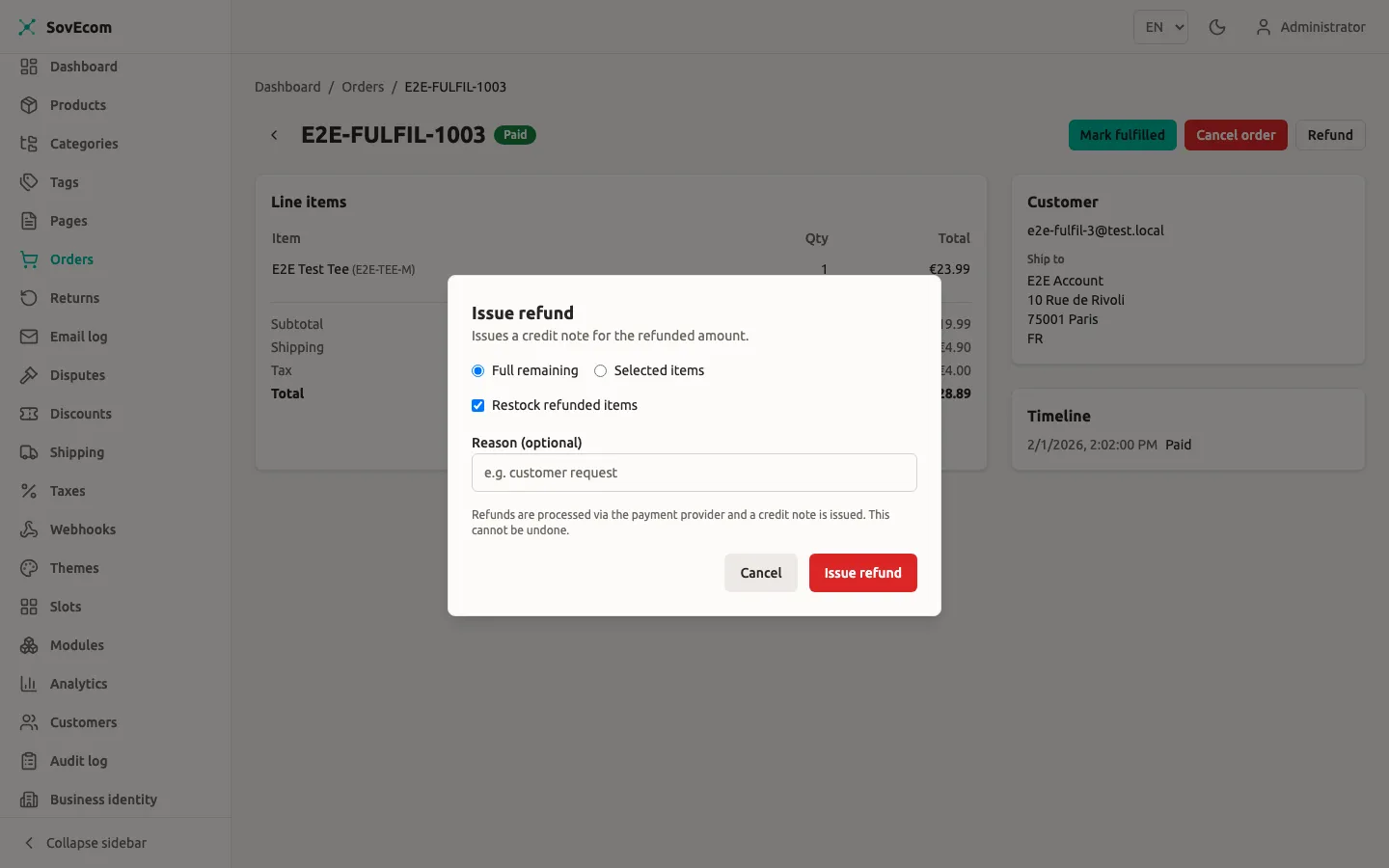
Section titled “Refunds and credit notes”You issue a refund against an order’s captured payment. SovEcom calls Stripe (or records an offline refund for a manual payment), issues a credit note with gapless numbering that corrects the original invoice, optionally restocks, and drives the order to refunded or partially_refunded. The money, the credit note, and the order state all commit together or roll back together.
POST /admin/v1/orders/:orderId/refundsContent-Type: application/json
{  "amount": 1500,  "reason": "Damaged on arrival",  "idempotencyKey": "refund-<orderId>-2026-06-25-a"}
Requires orders:write. Audited. Three mutually exclusive modes:
| Mode | Body | Effect |
|---|---|---|
| Full | neither items nor amount | Refunds the entire remaining balance. Add "restock": true to restock every unrefunded line |
| Line-item | items: [{ orderItemId, quantity, restock? }] | Refunds named lines by quantity; per-line restock |
| Partial-amount | amount: <minor units> | Refunds an arbitrary amount; no restock |
SovEcom computes the tax reversal per mode. Line refunds use cumulative-remainder rounding so the sum across all units equals the line’s exact paid tax, with no rounding drift that could over-reverse VAT. Partial-amount and full refunds reverse tax proportionally, clamped so the reversed tax can never exceed the order’s original VAT. A refund can never exceed the refundable remaining balance. An over-refund request returns 422.
Refunds initiated in the Stripe Dashboard
Section titled “Refunds initiated in the Stripe Dashboard”If you refund directly in Stripe’s own dashboard, the refund.created / charge.refunded webhook reconciles it back into SovEcom. SovEcom records the refund, issues the credit note, restocks nothing (amount-mode), drives the order state, and writes a system-actor audit entry. A dashboard refund and an API refund converge on the same records. Reconciliation is idempotent on the Stripe refund id, so the echoing webhook of an API-initiated refund is a no-op.
Async (SEPA) refunds
Section titled “Async (SEPA) refunds”A SEPA refund comes back pending. The money hasn’t moved and the bank may still reject it. SovEcom reserves the refunded amount (so a concurrent refund can’t over-refund) but defers the irreversible parts (the credit note and the order-state change) until Stripe confirms the refund succeeded. If the refund later fails, SovEcom backs out the reservation and never issues a credit note. A confirmed succeeded refund replays the deferred effects exactly once.
Disputes and chargebacks
Section titled “Disputes and chargebacks”When a cardholder disputes a charge, Stripe sends charge.dispute.created. SovEcom records the dispute against the order and payment, captures the evidence-due-by date, and freezes fulfillment on the order. While an order is frozen, SovEcom refuses its fulfilled and shipped transitions (422), so a disputed order can’t ship out from under you.
The dispute outcome (won / lost) is webhook-driven only. Stripe is the source of truth, and won / lost are terminal. SovEcom never lets a redelivered or out-of-order event regress a resolved dispute or re-freeze an order you already unfroze. A lost dispute reconciles its money through the refund path.
Read and act on disputes through the admin API:
# The dispute queue. Filter by status or order. Needs orders:read.GET /admin/v1/disputes?status=open
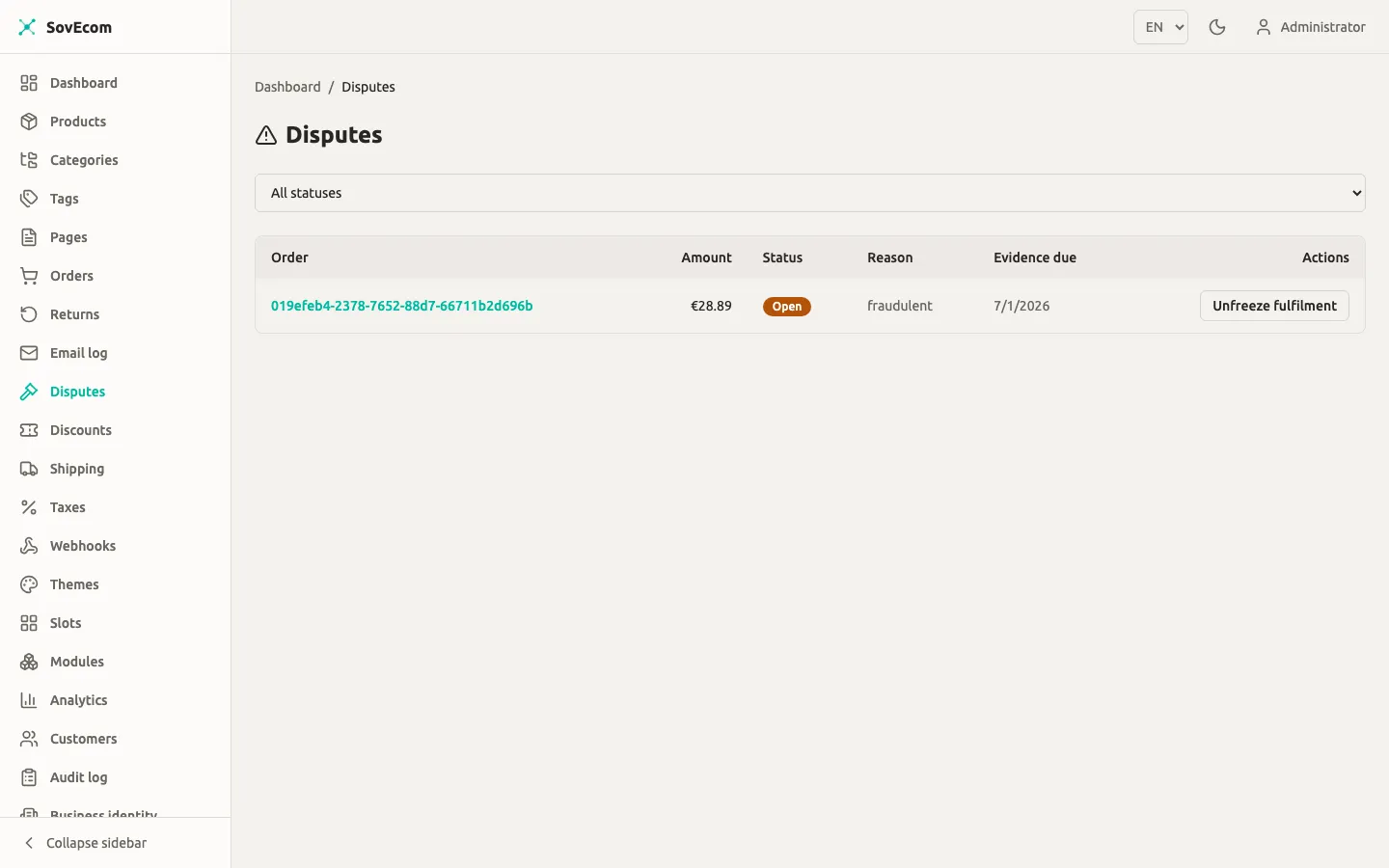
# Clear the fulfillment freeze a dispute placed on its order. Needs orders:write. Audited.POST /admin/v1/disputes/:id/unfreeze-fulfillmentOpen disputes appear in the Disputes queue (Disputes in the sidebar) with the order, amount, reason, and evidence-due date. A Stripe charge.dispute.created webhook records the dispute and freezes the order’s fulfilment so it cannot ship. When the dispute resolves, use Unfreeze fulfilment to release the order.
Unpaid-order cleanup
Section titled “Unpaid-order cleanup”Because SovEcom consumes stock when a payment intent is created, an abandoned checkout holds stock in a pending_payment order. A scheduled sweeper cancels orders that have sat unpaid past a TTL and restores their stock. Tune the window with:
# Minutes a pending_payment order may sit before the sweeper cancels it. Sensible default applies.UNPAID_ORDER_TTL_MINUTES=60The sweeper skips any order with a processing or succeeded payment, so an in-flight SEPA order is never cancelled while clearing. SovEcom clamps the TTL below the Stripe idempotency-key lifetime (about 24 hours), so a stale order is always cancelled before a second live charge could be created against it.
Security and reconciliation notes
Section titled “Security and reconciliation notes”- SAQ-A scope. The card PAN is collected only by Stripe’s hosted Element in the browser. No custom card form, no PAN at your API, no raw-card logging. Keep it that way; adding a custom card form would change your PCI scope.
- Webhook is truth. Order
paidstate is set by the verified webhook, never by the browser’s success redirect. A customer who fakes a success page does not get a paid order. - Watch the logs for loud lines. SovEcom surfaces a handful of rare races as error logs for you to reconcile by hand: a payment captured for a cancelled order (
PAYMENT CAPTURED FOR CANCELLED ORDER), a double collection on one order, or a gateway refund whose order has gone missing. These need a manual refund or reconciliation. SovEcom logs them precisely so you catch them.
Related guides
Section titled “Related guides”- Tax configuration: VAT, reverse charge, and how tax flows into invoices and credit notes.
- Shipping configuration: zones and rates that feed the order total Stripe charges.
SovEcom treats the Stripe webhook as the source of truth for payment state. Payment gateways are trusted core integrations, never sandboxed modules — untrusted third-party code is never granted access to the money path.