

EU Invoicing & VAT Operations
Your SovEcom store produces three fiscal documents: the legal invoice, the credit note, and the OSS export you file VAT against. This guide explains why your order numbers can skip values while your invoice numbers never can, what each invoice must legally carry, and how the One-Stop-Shop export feeds your quarterly return. The behavior here matches the API as shipped.
For the tax engine that computes VAT (rates, reverse charge, the €10,000 distance-sale threshold), see Taxes & VAT. For the refunds, returns, and 14-day withdrawal right that trigger credit notes, see Order Management.
Order numbers gap; invoice numbers do not
Section titled “Order numbers gap; invoice numbers do not”SovEcom keeps two separate counters because they answer to two different masters.
| Artefact | Field | Gaps allowed? | When allocated |
|---|---|---|---|
| Order | orders.order_number (e.g. FR2026-00042) | Yes | Early, before payment, via a Postgres sequence |
| Invoice | invoices.invoice_number (e.g. 2026-000001) | No, never | Only at issuance, after payment succeeds |
An order is a commercial record. A customer can start checkout, abandon it, or have a payment fail, and each of those burns an order number. That is fine. A gapless order counter would force you to hold a lock across the whole payment or fabricate filler orders, both worse than a harmless gap.
An invoice is a fiscal document. French CGI art. 242 nonies A and the EU VAT Directive (2006/112/EC arts. 220 to 230) require a continuous, gapless, chronological sequence per issuer. SovEcom enforces this with a dedicated counter table. A bare Postgres sequence will not do.
How the gapless guarantee works
Section titled “How the gapless guarantee works”A plain Postgres sequence (nextval()) gaps on rollback: it hands out a number, and if the transaction aborts the number is gone. That is illegal for invoices. So allocateGaplessNumber locks a row in invoice_counters per (tenant, series) with SELECT … FOR UPDATE, reads next_value, hands it out, and increments, all inside the issuing transaction.
If that transaction rolls back, the increment rolls back with it and the number is not consumed. The next successful issuance reuses it. Concurrent issuers serialize on the row lock, so two orders paid at the same instant cannot both claim number 42.
When an invoice is issued
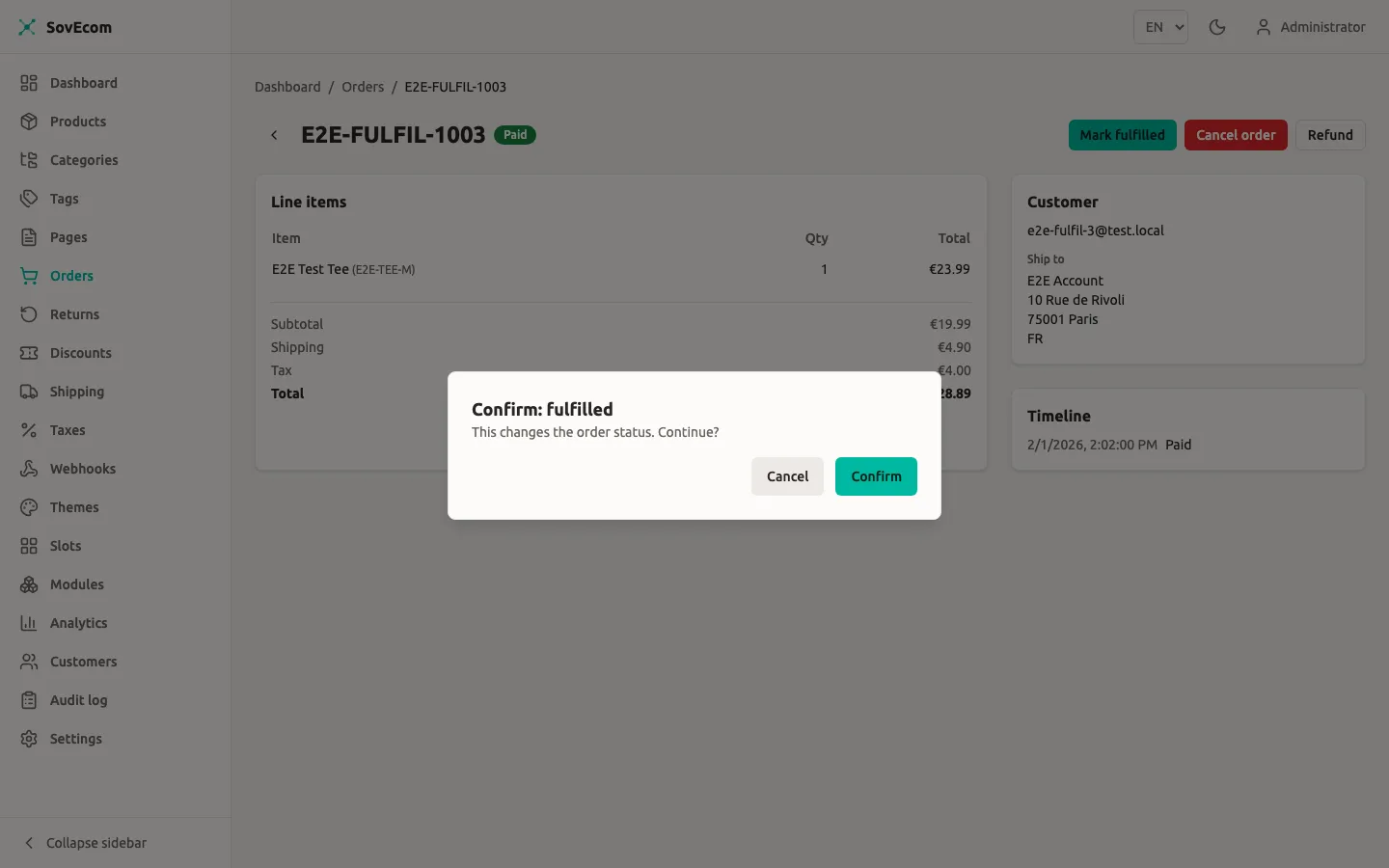
Section titled “When an invoice is issued”SovEcom issues the invoice for you. The service listens for the order.paid event and calls issueForOrder, which runs once per order:
- It checks whether an invoice already exists for the order. If one does, it returns that one and stops. The flow is idempotent, so a retried or re-emitted
order.paidnever produces a second invoice or consumes a second number. A partial unique index is the race-proof backstop behind the cheap pre-check. - It refuses only a pre-payment order. The gate is the true invariant, money captured, rather than a strict
status === 'paid'check. A paid order that already moved on tofulfilled,shipped,delivered,completed,refunded, orpartially_refundedstill gets its invoice. Onlypending_paymentis rejected with a409 Conflict. - In one transaction it allocates the gapless number, builds the immutable snapshots, and inserts the invoice row with
storage_keynull. - After the commit, it renders the PDF from the snapshot and attaches the storage key. This render is best-effort. If it fails, the invoice is still validly issued, and downloads render on demand from the snapshot.
Immutability and the snapshot
Section titled “Immutability and the snapshot”Once issued, an invoice is frozen. SovEcom snapshots the seller identity, buyer identity, line items, tax breakdown, and totals into JSONB on the invoice row at issuance. A later change to your tax settings, business name, or the order never alters an issued invoice. A database trigger blocks every mutation except the one transition the render needs: setting storage_key from null to a value, exactly once.
This is why corrections are issued as a separate credit note (below) and never as an edit. You cannot delete an issued invoice either.
Downloading invoices
Section titled “Downloading invoices”Two endpoints serve the PDF. Both render on demand from the snapshot when the stored PDF is missing.
| Caller | Route | Permission / auth |
|---|---|---|
| Admin | GET /admin/v1/orders/:orderId/invoice | orders:read |
| Customer | GET /store/v1/orders/:orderId/invoice | Customer JWT; the order must belong to the caller |
The customer endpoint runs an ownership check first. Another customer’s order, a guest order, or an order with no invoice all return 404, so an order id is never an enumeration oracle.
Re-rendering a failed PDF
Section titled “Re-rendering a failed PDF”If a render failed at issuance, the invoice row carries storage_key = null and downloads still work (rendered live from the snapshot). To materialize and store the PDF, call the reissue endpoint:
POST /admin/v1/orders/:orderId/invoice/reissueThis needs orders:write and is audited as invoice.reissued. It never re-allocates a number or re-issues the fiscal document. It only renders from the persisted snapshot and attaches the PDF. The response carries reissued and invoiceNumber. An already-stored invoice returns reissued: false.
What an invoice carries
Section titled “What an invoice carries”Your tax mode picks one of two layouts off the same snapshot (see Taxes & VAT).
nonemode prints a receipt. Net lines, totals, currency. No VAT column, no VAT breakdown, no SIREN/VAT on the seller block.eu_vatmode prints a VAT invoice. It adds a VAT column, a per-rate VAT breakdown, the seller’s SIREN/SIRET and VAT number, the buyer’s VAT number, and the mandatory mentions.
Mandatory mentions (eu_vat)
Section titled “Mandatory mentions (eu_vat)”A French/EU VAT invoice carries the following. SovEcom prints these from the snapshot:
| Field | Source |
|---|---|
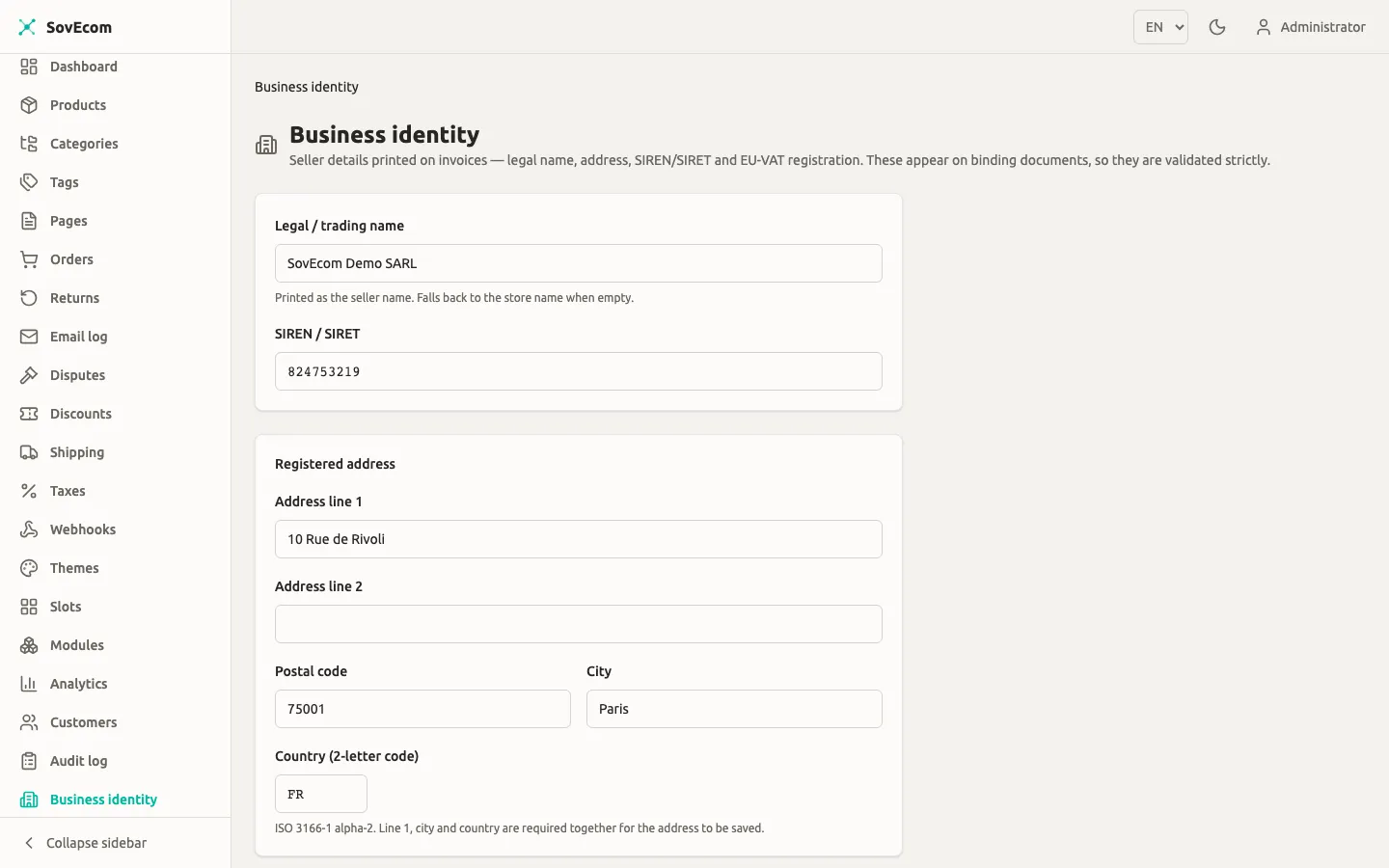
| Seller identity + address | tenants.settings.business_identity |
| Seller SIREN/SIRET | business_identity.siren (printed only in eu_vat) |
| Seller VAT number | settings.eu_vat_registration.vat_number (printed only in eu_vat) |
| Buyer identity + address | Order billing address |
| Buyer VAT number (B2B) | orders.vat_number |
| Invoice number + issue date | The gapless counter + issuance timestamp |
| Per-line description, qty, unit price ex-VAT | Order line items |
| VAT rate + amount per rate | The per-rate breakdown |
| Totals ex-VAT / VAT / incl-VAT | Reconciled order totals |
Set your store’s legal identity — name, address, SIREN/SIRET, and VAT number — on the Business identity screen. Invoice generation reads these for the mandatory legal mentions, so keep them accurate.
Reverse charge (B2B intra-EU)
Section titled “Reverse charge (B2B intra-EU)”On a reverse-charge order, the VAT invoice charges 0% and prints the autoliquidation note plus the legal basis. The default wording is:
Autoliquidation — VAT reverse charge. VAT to be accounted for by the recipient(EU intra-community supply, Art. 196 Directive 2006/112/EC / CGI art. 283-2).[PENDING-accountant: confirm exact legal basis]The invoice also prints the VIES consultation reference as the justification for the 0% charge. SovEcom reads this from the order’s snapshotted vies_consultation_ref first, then falls back to the customer’s stored VIES proof, guarded by the order’s VAT number so a since-re-validated number never prints a wrong reference. A guest order or a non-reverse-charge order prints no reference.
The no-VAT mention (none mode)
Section titled “The no-VAT mention (none mode)”In none mode the receipt prints a neutral default:
Prices shown are final; no VAT is applied under the current tax regime.[PENDING-accountant: confirm the applicable no-VAT mention, e.g. art. 293 B CGI]A small merchant below the VAT threshold typically prints “TVA non applicable, art. 293 B du CGI”. SovEcom does not hardcode that as binding. Confirm it with your accountant.
Money is always integer cents
Section titled “Money is always integer cents”Every amount on an invoice is integer minor units plus a currency code, never a float. A hard guard runs at issuance. The rendered figures must reconcile to order.total_amount, the per-rate recap must total the order VAT, and each rate row must satisfy rate × base ≈ VAT within one minor unit of rounding tolerance. If reconciliation fails, issuance aborts, the transaction rolls back, and no number is consumed. SovEcom never persists a non-reconciling fiscal document.
Credit notes (avoirs)
Section titled “Credit notes (avoirs)”A refund that reduces a fiscal total produces a credit note. SovEcom never edits the original invoice for this. The original stays untouched.
A credit note:
- has its own gapless series,
CN, allocated from a separateinvoice_countersrow, so it never collides with the invoice series (STD); - links back to the original via
corrects_invoice_idand prints “Corrects invoice: …”; - copies the original invoice’s seller and buyer snapshots so the corrective document matches the document it corrects;
- carries positive amounts under the French avoir convention, and mirrors the original’s VAT regime, so a reverse-charge order’s credit note prints the autoliquidation note too;
- reconciles to the refund total rather than the order total:
Σ line net + shipping net + VAT == total.
SovEcom issues the credit note inside the refund transaction. The PDF renders post-commit on the same best-effort path as invoices, and the document is titled CREDIT NOTE.
OSS export
Section titled “OSS export”The One-Stop-Shop export gives you the per-sale VAT data for your OSS return: cross-border B2C distance sales within the EU, on which you charged destination VAT.
When the export has data
Section titled “When the export has data”The export returns data only when all of these hold:
- your tax mode is
eu_vatand your origin country is in the EU-27; - your OSS posture is
above_or_opted_in(you crossed the €10,000 distance-sale threshold or opted in). Abelow_thresholdtenant charges origin VAT on the same sales and declares them in the domestic return, so it gets a header-only CSV; - the order is B2C (
is_b2b = false; B2B intra-EU is reverse charge, not OSS); - the destination (shipping country) differs from your origin, and both are EU-27;
- the order is not cancelled and not soft-deleted;
placed_atfalls inside the[from, to]window.
For any tenant that fails the first two gates, the endpoint still returns a valid CSV with just the header row.
Running the export
Section titled “Running the export”GET /admin/v1/taxes/oss-export?from=2026-01-01&to=2026-03-31This needs settings:read. The response is text/csv; charset=utf-8 with Content-Disposition: attachment; filename="oss-export.csv". A date-only to covers the whole closing day, inclusive to 23:59:59.999 UTC, so a quarter boundary captures every sale placed on the last day.
Reading the CSV
Section titled “Reading the CSV”The columns are stable:
| Column | Meaning |
|---|---|
order_number | The commercial order reference |
placed_at | ISO-8601 timestamp the order was placed |
destination_country | Buyer’s shipping country (the country whose VAT you owe) |
line_type | goods, shipping, or refund |
net | Net consideration, integer minor units (negative for refund) |
vat_rate | The statutory destination rate as a fraction (goods/shipping); for a refund row it is the refund’s effective ratio, a label, since the negative vat_amount is the authoritative figure |
vat_amount | VAT, integer minor units (negative for refund) |
currency | ISO 4217 code |
Each order emits its goods rows, then a single shipping row when shipping VAT exceeds zero. For EU distance sales, shipping VAT follows the goods rate and is declarable. Refunds issued in the window appear as negative refund rows attributed to the order’s destination, so the period reconciles to VAT collected minus VAT refunded.
Quarterly VAT reporting
Section titled “Quarterly VAT reporting”The OSS export is a convenience aid for your filing. It is not the filing itself. A practical quarterly flow:
- Confirm your posture for the quarter. If you crossed €10,000 mid-quarter, your earlier sales may have been charged origin VAT and your later sales destination VAT. The export reflects your current posture point-in-time and does not retro-snapshot a mid-period switch, so review the CSV against your threshold-crossing date.
- Pull the OSS export for the quarter window (
from= first day,to= last day). - Sum VAT per
destination_country. Goods plus shipping minus refunds gives net VAT collected per member state. That feeds the per-country lines of your OSS return. - Handle domestic and below-threshold sales separately. Sales charged origin VAT (you were
below_threshold, or the sale was domestic) belong in your national VAT return, not the OSS return. They are not in this export. - Reconcile against issued credit notes. Every refund row should map to a
CN-series credit note. The gaplessCNseries gives you a continuous audit trail. - File through your OSS portal by the deadline (OSS returns are quarterly in most member states). SovEcom does not submit on your behalf.
Factur-X and structured e-invoicing
Section titled “Factur-X and structured e-invoicing”SovEcom issues human-readable PDF invoices today. Structured e-invoicing is planned and not yet shipped.
Two delivery tracks exist:
- Legal invoice generation (PDF, gapless number, mandatory mentions). Shipped. This is what this guide documents.
- Structured e-invoicing (Factur-X hybrid PDF/XML, Peppol, French PDP routing). Planned for a future release. The invoice data model is built Factur-X-ready: the row carries the fields EN 16931 / Factur-X BASIC needs, so the structured serializer becomes an extension over existing data without a schema migration. The current PDF renderer produces a plain PDF. It does not yet produce a PDF/A-3 with embedded XML.
French mandate dates
Section titled “French mandate dates”The dates below reflect the current DGFIP mandate schedule. They have moved before. Confirm against current DGFIP guidance at the time you act.
| Obligation | Who | Target date |
|---|---|---|
| Must be able to receive structured e-invoices | All French VAT-registered businesses | 1 September 2026 |
| Must issue structured e-invoices | Large + mid-size enterprises | 1 September 2026 |
| Must issue structured e-invoices | SMEs / micro | 1 September 2027 |